User Guide
The Employee Tracker allows small business owners to keep track of their employees information using a single platform instead of having to deal with multiple data management tools. Through a simple and intuitive graphical user interface, business owners can record and view their employees information.
- Quick start
-
Features
- Viewing help :
help - Adding an employee record :
add - Listing all employee records :
list - Editing an employee record :
edit - Deleting an employee record :
delete - Sorting employee records :
sort - Finding employee records :
find - Clearing all employee records :
clear - Viewing summary statistics :
stats - Exiting the program :
exit - Saving the data
- Viewing help :
- FAQ
- Command summary
Quick start
- Ensure you have Java
11or above installed in your Computer. - Download the latest
employeetracker.jarhere. - Copy
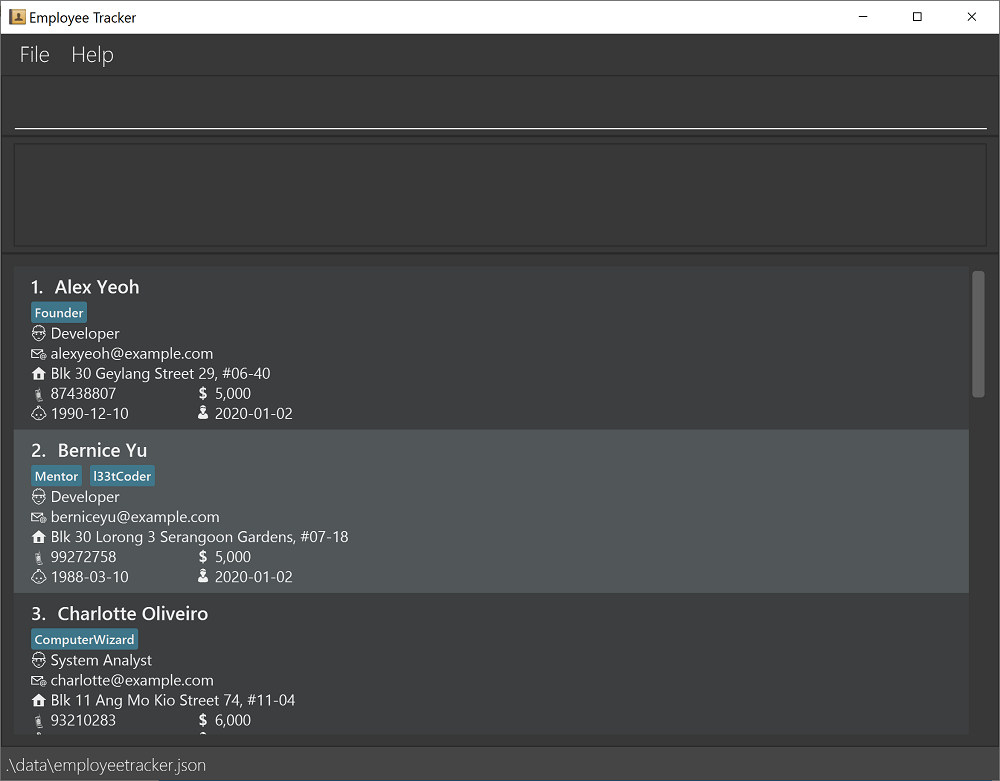
employeetracker.jarto the folder you want to use as the home folder for Employee Tracker. - Double-click the file to start the app. The GUI similar to the one below should appear in a few seconds. Note that the app contains some sample data.
- Type the command in the command box and press
Enterto execute it.
Some example commands you can try:-
add n/Rachel Lee r/Designer p/91648917 e/rachel@example.com a/BLK 730 Woodlands Road #15-150 b/1988-01-02 j/2020-09-01 s/8000 t/Founder t/l33tCoder: Adds an employee record. -
list: Lists all employee records. -
delete 3: Deletes the 3rd employee record shown in the current list. -
sort n: Sorts all employee records based onNamein alphabetical order. -
find n/Rachel: Finds all employee records withRachelin itsNamefield. -
stats: Shows summary statistics of employees.
-
- Refer to Features below for details of each command.
Features
 Notes about the command format:
-
Words in
UPPER_CASEare the parameters to be supplied by the user.
E.g. The parameterINDEXin the commanddelete INDEX. -
Parameters in square brackets are optional. E.g. The parameter
[s/SALARY]inedit INDEX [n/NAME] [r/ROLE] [p/PHONE_NUMBER] [e/EMAIL] [a/ADDRESS] [b/DATE_OF_BIRTH] [j/DATE_OF_JOINING] [s/SALARY] [t/TAG]… -
Parameters with
…after them can be included multiple times.
E.g. The parameterKEYWORDin the commandfind TYPE/KEYWORD…. -
Parameters can be in any order.
E.g. The commandaddrequires a few parameters such asn/NAME,e/EMAILandr/ROLE. Placing these parameters in any order is acceptable. -
If a parameter is expected only once in the command but is specified multiple times, only the last occurrence of this parameter will be taken.
E.g. Ifn/John Lam n/John Leeis specified in theaddcommand, onlyn/John Leewill be taken. -
Unneeded parameters for commands that do not take in parameters (such as
help,list,exit,statsandclear) will be ignored.
E.g. The commandhelp 123will be interpreted ashelp.
Viewing help : help
Shows the URL of the user manual.

Format: help
Adding an employee record : add
Adds an employee record to the Employee Tracker.
Format: add n/NAME r/ROLE p/PHONE_NUMBER e/EMAIL a/ADDRESS b/DATE_OF_BIRTH j/DATE_OF_JOINING s/SALARY [t/TAG]…
-
NAMEmust only contain alphanumeric characters and spaces. E.g.John Doe. -
PHONE_NUMBERmust be a number that is at least 3-digit long. E.g.98714821,67617361. -
EMAILmust be in local-part@domain format. E.g.andy@example.com. -
DATE_OF_BIRTHmust be in yyyy-MM-dd format and must not be in the future. E.g.1990-12-25. -
DATE_OF_JOININGmust be in yyyy-MM-dd format. E.g.2020-09-01. -
SALARYmust be a positive integer. E.g.4000,3000. -
TAGmust be alphanumeric. E.g.Founder,l33tCoder.
 Note:
All employee records must have a unique combination of name and date of birth.
A new employee record will not be added if there is an existing employee record with the same name and date of birth.
Tip:
An employee record can have any number of tags (including 0).
Note:
All employee records must have a unique combination of name and date of birth.
A new employee record will not be added if there is an existing employee record with the same name and date of birth.
Tip:
An employee record can have any number of tags (including 0).
Example of usage:
add n/Rachel Lee r/Designer p/91648917 e/rachel@example.com a/BLK 730 Woodlands Road #15-150 b/1988-01-02 j/2020-09-01 s/8000 t/Founder t/l33tCoder
Listing all employee records : list
Lists all the employee records in the Employee Tracker.
Format: list
Editing an employee record : edit
Edits an employee record in the Employee Tracker.
Format: edit INDEX [n/NAME] [r/ROLE] [p/PHONE_NUMBER] [e/EMAIL] [a/ADDRESS] [b/DATE_OF_BIRTH] [j/DATE_OF_JOINING] [s/SALARY] [t/TAG]…
-
INDEXrefers to the index number shown in the list of employee records. -
INDEXmust a positive integer. E.g.1,2,3… - At least one of the optional parameters must be provided.
- The employee record indicated by the index number will be edited.
-
NAMEmust only contain alphanumeric characters and spaces. E.g.John Doe. -
PHONE_NUMBERmust be a number that is at least 3-digit long. E.g.98714821,67617361. -
EMAILmust be in local-part@domain format. E.g.andy@example.com. -
DATE_OF_BIRTHmust be in yyyy-MM-dd format and must not be in the future. E.g.1990-12-25. -
DATE_OF_JOININGmust be in yyyy-MM-dd format. E.g.2020-09-01. -
SALARYmust be a positive integer. E.g.4000,3000. -
TAGmust be alphanumeric. E.g.Founder,l33tCoder. - All existing tags for this employee record will be removed if
TAGis not provided in the[t/TAG]parameter. E.g.edit 1 t/. - Editing tags will remove all existing tags for this employee record. E.g. If an employee record 1 has tags
Mentorandl33tCoder,edit 1 t/WiseGuywill result in this employee record only having the tagWiseGuy.
Example of usage:
edit 1 p/91821748 s/9000 t/Mentor t/l33tCoder
Deleting an employee record : delete
Deletes the specified employee from the Employee Tracker.
Format: delete INDEX
-
INDEXrefers to the index number shown in the list of employee records. -
INDEXmust a positive integer. E.g.1,2,3… - The employee record indicated by the index number will be deleted.
Examples of usage:
-
listfollowed bydelete 2deletes the 2nd employee record shown in the list of employee records. -
find n/Rachelfollowed bydelete 1deletes the 1st employee record in the list generated by thefindcommand.
Sorting employee records : sort
Sorts the list of employee records in the Employee Tracker.
Format: sort TYPE
-
TYPEmust be the lettern,s,jorb. - If
TYPEis n, the employee records will be sorted based on name in alphabetical order. - If
TYPEis s, the employee records will be sorted based on salary in increasing order. - If
TYPEis j, the employee records will be sorted based on date of joining from the earliest date to the latest date. - If
TYPEis b, the employee records will be sorted based on date of birth from the earliest date to the latest date. - The
TYPEis case-insensitive. E.g. sort typeNwill matchn.
Example of usage:
sort n
Finding employee records : find
Finds employee records that have any of the given keywords in their name/role/address/date of birth/phone number.
Format: find TYPE/KEYWORD…
-
TYPEmust be the lettern,r,a,borp. - If
TYPEisn, the search will be based on name. - If
TYPEisr, the search will be based on role. - If
TYPEisa, the search will be based on address. - If
TYPEisb, the search will be based on date of birth. - If
TYPEisp, the search will be based on phone number. - The search is case-insensitive. E.g. keyword
johnwill matchJohn. - Only exact words will be matched. E.g. keyword
Johwill not matchJohn. - Exception for the phone number search: it allows a partial match of value at least 3 digits long.
- Employee records matching at least one keyword will be returned. E.g. keywords
John Wongwill returnJohn LamandBernice Wong.
Example of usage:
-
find n/David Bernice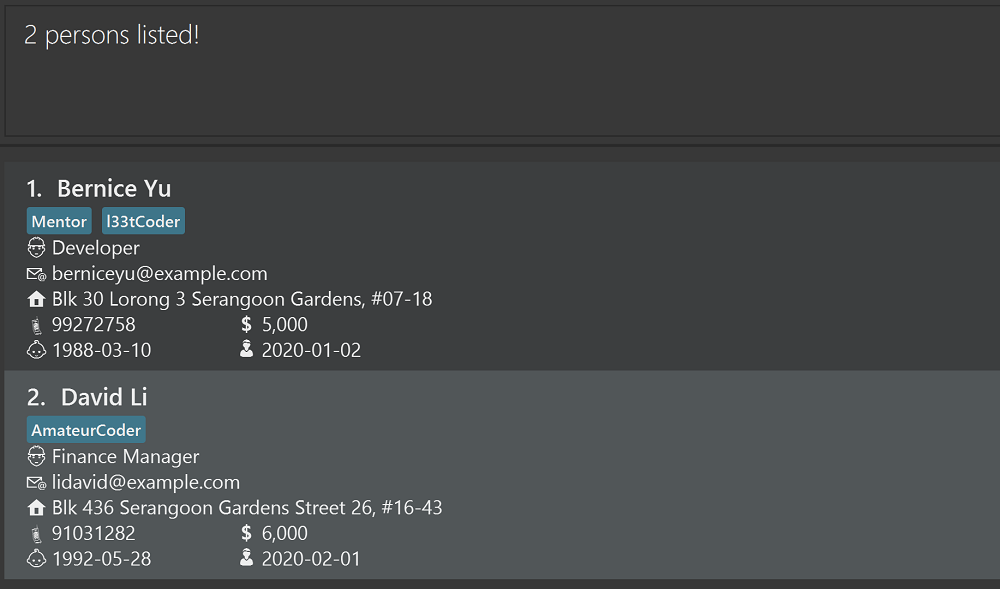
Clearing all employee records : clear
Clears all employee records from the Employee Tracker.
Format: clear
Viewing summary statistics : stats
Shows summary statistics of employees including:
- Total employees.
- Total salary.
- Highest, lowest and average salary.
- Longest, shortest and average tenure.
Format: stats
Exiting the program : exit
Exits the Employee Tracker app.
Format: exit
Saving the data
There is no save command because any change to the data in the Employee Tracker will be automatically saved.
FAQ
Q: How do I transfer my data to another computer?
A:
Go to the Employee Tracker’s root folder in the current computer.
Copy the data folder and paste it into the Employee Tracker’s root folder in the new computer.
Click Yes if the system prompts you for confirmation of overwriting.
Command summary
| Action | Format, Examples |
|---|---|
| Help | help |
| Add |
add n/NAME r/ROLE p/PHONE_NUMBER e/EMAIL a/ADDRESS b/DATE_OF_BIRTH j/DATE_OF_JOINING s/SALARY [t/TAG]… E.g. add n/Rachel Lee r/Designer p/91648917 e/rachel@example.com a/BLK 730 Woodlands Road #15-150 b/1988-01-02 j/2020-09-01 s/8000 t/Founder t/l33tCoder
|
| List | list |
| Edit |
edit INDEX [n/NAME] [r/ROLE] [p/PHONE_NUMBER] [e/EMAIL] [a/ADDRESS] [b/DATE_OF_BIRTH] [j/DATE_OF_JOINING] [s/SALARY] [t/TAG]… E.g. edit 1 p/91821748 s/9000 t/Mentor t/l33tCoder
|
| Delete |
delete INDEXE.g. delete 2
|
| Sort |
sort TYPE E.g. sort n
|
| Find |
find TYPE/KEYWORDE.g. find n/David Bernice, find r/Developer, find a/Serangoon, find b/1992-05-28, find p/910
|
| Stats | stats |
| Clear | clear |